Wednesday, November 27, 2013

Selecting Code Vertically in Visual Studio

Here's a cool feature that you probably not familiar with - You can make a selection box of text while pressing Alt key while dragging the mouse, within Visual Studio.

This is what happens when selecting text in the standard way:

selecting text in the standard way

Here are some good use cases for this feature:
Vertical selection of code:
vertical selection of code
Zero length selection:
zero length selection
 Multiple line typing:
multiple line typing

You can use this feature to a variety of purposes - adding, deleting, editing a vertical selection of code, also copying and pasting, and generally be more pragmatic :)

Sunday, June 16, 2013

OSS at its Best

I was on a quest for a good library for Multi-Touch support in a Silverlight application, when I found Multi-Touch Behaviors – which is a nice project that contains Windows Phone / Silverlight Behaviors and WPF samples implementing Multi-Touch Manipulation (Gestures) and Inertia, By Davide Zordan which by chance I also read his blog.

So after deciding to give it a try, I searched for it on the NuGet gallery, which unfortunately yielded no results. I looked at the issues page and found an opened work item about adding a nugget package. That issue had only one vote, so I added another one myself.

Next morning (less than 24 hours!) I received an update that the feature was implemented, also a post on Davide’s blog, and the package was already up on the NuGet gallery!

That friends, Is open source software at its best.

Thanks Davide :)

Saturday, April 20, 2013

IDF .NET Day 2013

Last month (19/3/2013) a friend of mine, who works in the .NET infrastructure team, was organizing a one-day event which was supposed to be for all .NET teams in Ofek.

I was asked to give a presentation on that event about multi-touch if I want to. This was because my team and I started a prototype for multi-touch screens a few months back, and he wanted me the share things and thought that I have learned from that experience (future post will be on that too :)). So I said to him: “sure why not”. I mean how bad could that be? :)

Apparently many people from different departments from the organization had heard about this event and they were also interested in it, so all of a sudden I was supposed to talk in front of 200 .NET folks from the entire organization, at the Microsoft Israel R&D Center auditorium. God damn!

I was so excited about this upcoming event, I worked very hard on the presentation and my speech technique, did a few rehearsals, and finally the awaited day arrived.

My presenter tag :)

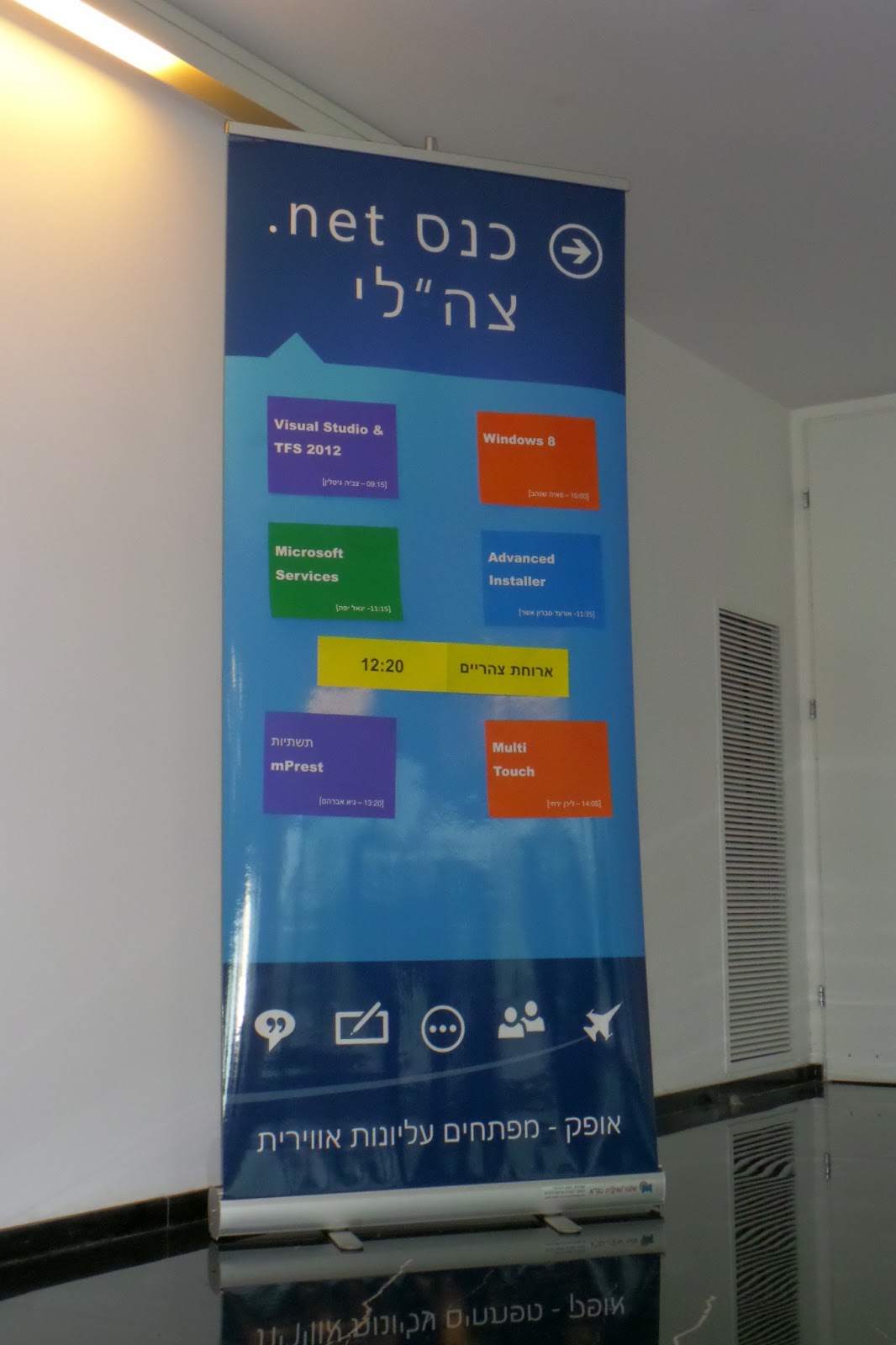
.NET Day 2013 Agenda

Breakfast at Microsoft Israel R&D Center

SAM_0091

Preparations

Preparations

Multi-Touch!

In action

The audience

In action

(Sorry for the poor quality, believe me – those are the best ones)

It was a BLAST!

At first I was very excited and even a little anxious, but that feeling was gone after the first 3 minutes or so. That was probably thanks to the preparations I’ve done before that day.

I’m glad I got this opportunity to speak in front of this audience, and even happier I accepted it and had it done :)

The slides are up on my SkyDrive and publicly available here: http://sdrv.ms/11nWEGk . It may not completely work on the PowerPoint web app, so be welcome to download it and run it from your computer.

Cheers.

Friday, March 15, 2013

Google Reader is Retiring

July 1, 2013 will be a very sad day.

I woke up this morning, went to the shower, got something to eat and sat down with my laptop. As I usually do - first things first - I checked out my Gmail, Facebook, and Google Reader.

So I was after my Gmail and Facebook routine and ready to read some blog posts. I got into Reader and I was very sad the see this pop-up:


Google is shutting down Google Reader?
No way.
I was like:


I started searching the web for a reason for this same. Here's the official announcement.

Google reader is a Great product, and besides Gmail, I use it almost on a daily basis. It has a nice and clean UI, its lightweight, and it gets the job done without any BS (ads). I also loved the fact that it's a web app. I don't want to install a messy client app to do a simple job like this...

The community already has set up a petition (keepgooglereader.com) to ask Google to keep Google Reader alive, and if not - release to code so that the OSS community will find a way to keep it going. If you like Google Reader please sign it.

Off to find an alternative... Any recommendations? :)

Friday, November 9, 2012

Closing all Child Windows using JavaScript

Hi everyone,

Sorry that it took me so much time to write this 2nd part post, I was pretty loaded at work and personal life, and frankly, I still need to get used to write blog posts ;). I hope that in the future I will be able to write more often, and without these long pauses. Anyway, let’s get down to business.

In my last post I described the way we handle window opening in one of the web application we work on. Just to remind you, we have a single main page that has to be stayed open all the time. This page opens a lot of other page as pop-ups. Those pop-ups can open their own child windows, as pop-up windows or pop-up modal dialogs. Actually it looks like this:

child-windows

I will actually go straight to the implementation of this, but first there are few things we have to remember:

  1. The main page has to be always open, and when it closes all the child windows has to be closed to. So we need to close the child windows when the parent windows are closed, (or starts the process of closing).
  2. When there is a modal dialog opened, the parent window that opened it is frozen, hence cannot run any JavaScript.
  3. The child window cannot always know about his parent window, but the parent window always knows about all of his child windows. That means that the parent should be responsible for the closure of the children.

Given all that, this is how we need to close the child windows:

closing-windows

Finally, code:

Every parent window (e.g. window that opens other windows) should hold a list of references to its child windows, and when it opens a new window it should be added to that list. So we will add this JavaScript code to the head part of the page:

<script type="text/javascript">
var childWindows = [];

function OpenChildWindow() {
var openedWindow = window.open(url, pageName, params);
childWindows[childWindows.length] = openedWindow;
}
</script>

This should be in every page that can open other pages as separate window.


But what about this modal dialog thing? Well, this can be a little bit tricky. Because the window.openModalDialog() function doesn’t return a reference of the dialog, we need to do something like this in the parent script:

<script type="text/javascript">
var childWindows = [];

function OpenModalDialog() {
window.showModalDialog(url, window, params);
}
</script>

And this script in the child dialog:

<script type="text/javascript">
window.dialogArguments.childWindows[window.dialogArguments.childWindows.length] = window;
</script>

This code will pass a reference of the parent window to the child in the second argument (which can used to send all sort of data to the modal dialog), and the modal dialog is responsible to register itself to his parents’ childWindows list, when it’s loaded.


Following this pattern in all of the windows, and you will be able to get to any window from the main page within your code. This is important because of #3 above.


Next, I added this code the main page:

<script type="text/javascript">
function CloseAllChildWindows(window) {
for (var i = 0; i < window.childWindows.length; i++) {
if ((typeof window.childWindows[i].childWindows != "unknown") &&
(typeof window.childWindows[i].childWindows != "undefined")) {
if (window.childWindows[i].childWindows.length > 0) {
CloseAllChildWindows(window.childWindows[i]);
}
}
if (!window.childWindows[i].closed) {
window.childWindows[i].close();
}
}
}
</script>

This main page function will be called when the body.onunload is fired:

<body onunload="CloseAllChildWindows()">

It will go thru all windows, recursively closing all of them, starting from the youngest up to the oldest, and finally the main page will close itself. This will take care of #1 above.


You can notice that the function always check the second hierarchy from the current window. That’s because #2 - The script can’t ask a direct child window to close it’s modal child window, because this will hand the browser process, because the JavaScript code is jammed. Remember modal dialogs freeze their parent window? :)


You can enhance this logic, and check if there are child windows opened, and if there are, prompt the user and ask him if he is sure that he wants to leave the website. Actually, I’ve done this. You can achieve by adding this script to the main page:

    function ThereAreOpenedChildWindows() {
for (var i = 0; i < window.childWindows.length; i++) {
if (!window.childWindows[i].closed) {
return true;
}
}
return false;
}

function PromtUserClosingAllWindows() {
if (ThereAreOpenedChildWindows()) {
window.event.returnValue = "Leaving this page will close all child windows. Continue?";
}
else
return;
};

Note: I tested this code on IE and Chrome. It only works on IE, but I was OK with it since this is what we needed. There is no guarantee that this code will work on different browsers.


And register to the onbeforeunload event of the body:

<body onunload="PromtUserClosingAllWindows()">

That’s it! Hope this post was helpful, good luck closing child windows :)

Sunday, July 15, 2012

Child Windows Issues

At my work we have a web application which is designed as a single main page which is sort of a “main control page”, that needs to be staying open all the time. Also, there are many other pages on the app which provides the ability to manage data, preform actions, configure settings, etc. The user needs some way to reach those pages, but since the main page has to stay open all the time, it was decided that those pages will be opened in a pop-up styled separate window. That way the users can do what they like while the main page remains opened at the background. For example:

Child windows

That’s not all.

Some of those child windows show their own pop-ups that are opened as a modal dialog (mostly to interact with the user – success/failure of operations, validation…). As you may or may not know, modal dialogs block the parent window, and only the parent window (in fact, it freezes the parent window from running JavaScript at the background). That means that the main window stays reactive all the time. Generally it looks like this: 

Child window with a modal

Also, some of those pop-up windows have links to other windows, which are opened as pop-ups of the pop-up window. Confused? Me too. The main window has a child window, which also has a child window. So actually we possibly have an unknown number of “levels” of child windows. In theory that number can get very large.

Combining all of the above, it may look like this:

Jungle

Here comes the problem. Recently we’ve noticed that the end users sometimes close the app’s main page, and forget to close a child window which accidently stayed opened. The result is an “orphan” pop-up which, of course, is useless without the main page :)

After we discovered this issue, we decided that the main page should be responsible for the closure of all its child windows when it is closed. We had to come up with a smart enough way to handle the complex cases we have.

In the next post I’ll show the implementation for this, stay tuned.

Saturday, June 9, 2012

Book: The Art of Unit Testing

The Art of Unit TestingThe Art of Unit Testing is a great book by Roy Osherove, the TDD Guru, which tries to instill us the philosophy of writing unit tests in the fastest way without neglecting the basics and the important fundamentals, and he does that perfectly. The book is written with examples in .NET with NUnit as the Unit testing framework and Rhino Mocks as the Isolation framework which are free and open source. It’s suitable for both newbies and experienced – everyone can find something that he can learn about in this book.

The book is divided to 4 parts, but I prefer to divide it into 2 parts:

The first part is all about Unit Testing basics – the definition of “unit test” and what is its goals. It explains that a unit test must meet the following requirements:

  • Trustworthy
  • Readable
  • Maintainable

Without one of these requirements, your test is no good. Then he shows how to write a simple unit test. Later on it starts to get a little deeper, and provides a definition to “stub”. He starts to talk a lot about the design of your code, about how to break dependencies and then how to inject those dependencies as stubs. Starts to get interesting, huh?

The second part (by my division), Roy describes the importance of organizing your tests – how to locate them in terms of solution structure, projects and classes. He discusses on making a testing infrastructure in your team, on integrating your unit tests in your Continuous integration process so that your tests will run on every commit. After that, Roy explains in detail the three requirements that a unit test must have (mentioned above). While reaching the end of the book, he talk about how to integrate unit tests in your organization, which tools you may find useful and what you should be aware of. The last chapter of that book, which in my opinion was the most interesting and enriching, is about working with legacy code – how do test code that its design isn’t testable and preventing you to inject dependencies? How you refactor this kind of code? And many more philosophic topics. Super interesting. Of course it was impossible to cover the whole topic; therefor Roy makes references to Michael Feathers' book Working Effectively with Legacy Code.

TDD

While I was reading this book, I was sort of a beginner developer but I already had a little bit experience in writing unit tests and practicing TDD, therefor I found the first chapters a bit less relevant for me. But it was still nice to understand a little deeper – why it’s important to have a good coverage to your code, and to have readable tests. What I specially loved about this book, besides it is suitable both for beginners and experienced, is that it’s manages to be very practical and yet enough theoretical to be interesting. In addition it’s written in very comfortable English (not so high), so it’s not that boring. :)

I recommend everyone to read this book – from newbies to seniors, team leaders, and even hardcore TDD programmers who want to refresh their basics about TDD.